
GPT Image 2 API price
GPT Image 2 API Pricing
Check GPT Image 2 API pricing, estimate image-generation costs, and plan budgets across quality, size, retries, and production controls.
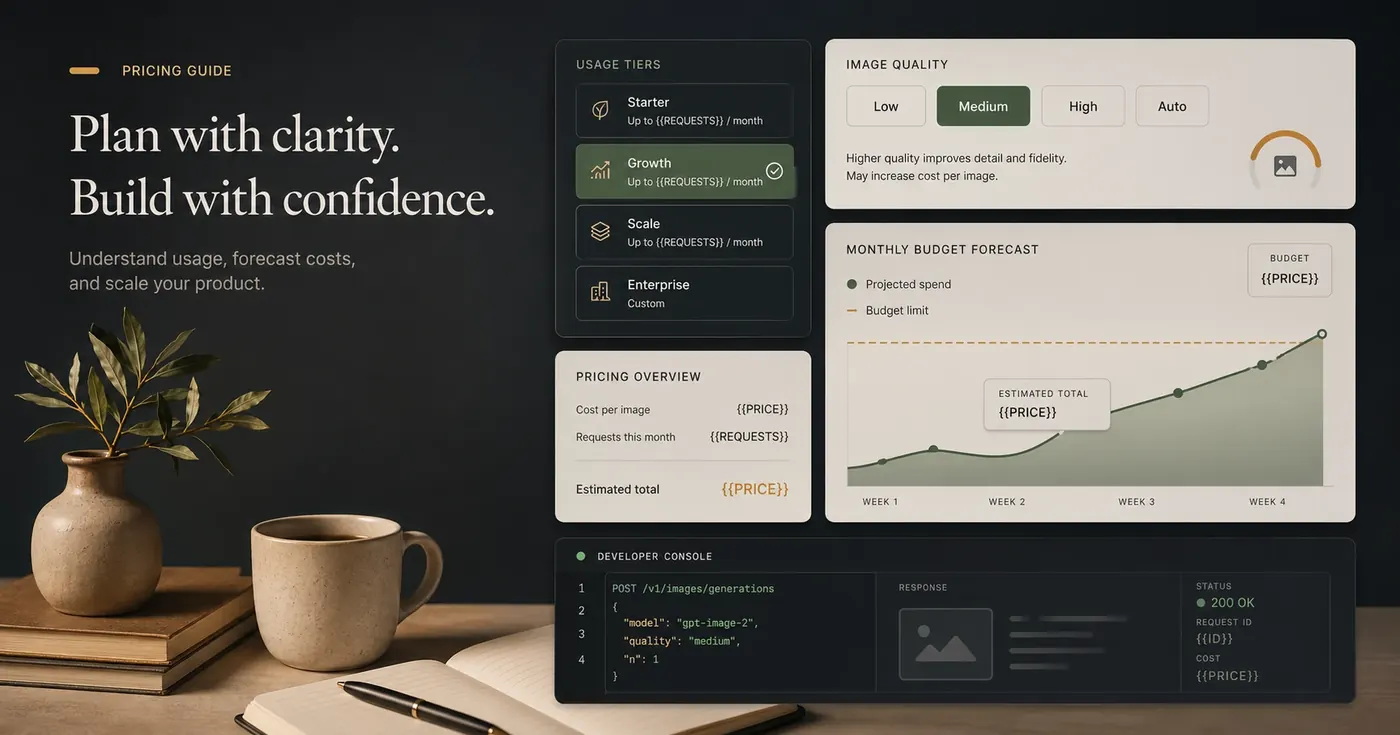
Quick answer
As of April 28, 2026, OpenAI's official pricing page lists GPT Image 2 at:
| Meter | Official price checked on 2026-04-28 |
|---|---|
| Text input | $5.00 / 1M tokens |
| Cached text input | $1.25 / 1M tokens |
| Image input | $8.00 / 1M tokens |
| Cached image input | $2.00 / 1M tokens |
| Image output | $30.00 / 1M tokens |
Source for integration review: OpenAI API Pricing, plus the GPT Image 2 model docs. Re-check both pages before publishing because API pricing can change.
GPT Image 2 API cost should be estimated from four variables: the official token price, the number of images generated, the selected quality level, and the final image size / image-token usage. Do not budget from screenshots, old blog posts, or copied price tables.
Use this planning formula:
Estimated monthly image cost =
  planned image requests
  x average outputs per request
  x cost per output at selected quality / size
  x retry and rejection multiplier
For production planning, keep these fields editable in your internal spreadsheet:
| Field | Replace With Before Publishing |
|---|---|
GPT_IMAGE_2_TEXT_INPUT_PRICE | $5.00 / 1M tokens as of 2026-04-28 |
GPT_IMAGE_2_CACHED_TEXT_INPUT_PRICE | $1.25 / 1M tokens as of 2026-04-28 |
GPT_IMAGE_2_IMAGE_INPUT_PRICE | $8.00 / 1M tokens as of 2026-04-28 |
GPT_IMAGE_2_CACHED_IMAGE_INPUT_PRICE | $2.00 / 1M tokens as of 2026-04-28 |
GPT_IMAGE_2_IMAGE_OUTPUT_PRICE | $30.00 / 1M tokens as of 2026-04-28 |
PUBLISH_DATE_PRICING_CHECK | Date the publisher re-checked official pricing |
ChatGPTImages is an independent guide, prompt library, and visual workflow site. It is not an OpenAI product and does not set GPT Image 2 API prices.
How GPT Image 2 API Pricing Works
OpenAI API pricing can change, and image models are billed through input tokens and image output tokens. Quality and size matter because they influence how many output image tokens a result consumes.
For GPT Image 2 planning, treat cost as a function of:
- Request volume: how many generations or edits your app will call.
- Outputs per request: whether you request one final image or multiple candidates.
- Quality setting:
low,medium,high, orauto. - Size / resolution target: larger outputs usually cost more than smaller drafts.
- Prompt and reference inputs: long prompts and uploaded images may affect tokenized input costs when the official pricing model separates input and output.
- Retries: failed, rejected, or "not good enough" images still consume budget if the API call succeeds.
- Workflow stage: ideation, QA, campaign launch, and user-facing production should not all use the same quality setting.
The practical takeaway: the unit price is only half the budget. The workflow design determines how many billable attempts you create.
A Cost Estimation Worksheet
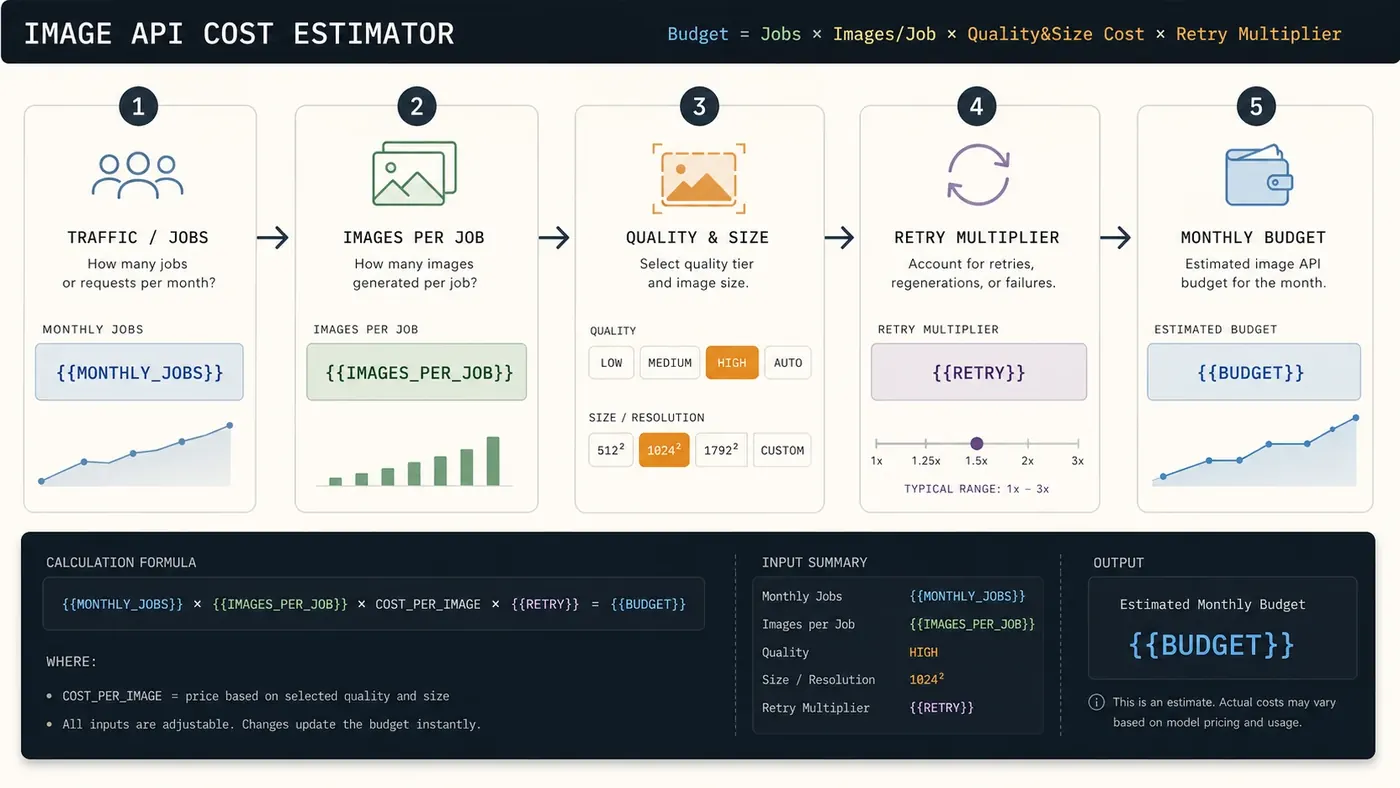
Use this worksheet before building the feature:
| Step | Question | Example Planning Field |
|---|---|---|
| 1 | What event triggers image generation? | signup, listing creation, ad build, weekly campaign |
| 2 | How many users or jobs trigger that event monthly? | {{MONTHLY_ACTIVE_JOBS}} |
| 3 | How many images are generated per job? | {{IMAGES_PER_JOB}} |
| 4 | How many candidates are discarded? | {{RETRY_MULTIPLIER}} |
| 5 | What quality is needed at this stage? | low, medium, high, auto |
| 6 | What final size is actually used? | thumbnail, square hero, vertical ad, large campaign asset |
| 7 | Can humans approve before high-quality generation? | yes / no |
Then calculate:
Monthly requests = {{MONTHLY_ACTIVE_JOBS}} x {{IMAGES_PER_JOB}}
Billable output estimate = Monthly requests x {{RETRY_MULTIPLIER}}
Monthly budget = Billable output estimate x {{SELECTED_GPT_IMAGE_2_PRICE_FIELD}}
Use a retry multiplier even if you believe your prompts are strong. A practical starting range is:
| Workflow Maturity | Retry Multiplier To Test |
|---|---|
| New prompt, no review loop | {{RETRY_MULTIPLIER_HIGH}} |
| Prompt template with light QA | {{RETRY_MULTIPLIER_MEDIUM}} |
| Stable template with approved references | {{RETRY_MULTIPLIER_LOW}} |
Do not publish these multipliers as universal truth. Measure them from your own logs.
Budget Examples By Use Case
These examples use placeholders so your team can insert official prices later.
1. SaaS onboarding thumbnails
A small SaaS product wants to generate one visual thumbnail for each new workspace.
New workspaces per month: {{WORKSPACES_PER_MONTH}}
Images per workspace: 1
Quality: low for draft, medium only if user selects "upgrade visual"
Retry multiplier: {{RETRY_MULTIPLIER_LOW_TO_MEDIUM}}
Estimated monthly cost:
{{WORKSPACES_PER_MONTH}} x 1 x {{RETRY_MULTIPLIER_LOW_TO_MEDIUM}} x {{GPT_IMAGE_2_LOW_OR_MEDIUM_PRICE}}
Recommended strategy: default to low or auto during onboarding, store the accepted result, and regenerate only when the user asks.
2. Marketplace listing images
A marketplace lets sellers create cleaned-up product backgrounds from uploaded photos.
Listings per month: {{LISTINGS_PER_MONTH}}
Edited images per listing: {{IMAGES_PER_LISTING}}
Quality: medium
Reference image input: yes
Retry multiplier: {{RETRY_MULTIPLIER_MEDIUM}}
Estimated monthly cost:
{{LISTINGS_PER_MONTH}} x {{IMAGES_PER_LISTING}} x {{RETRY_MULTIPLIER_MEDIUM}} x {{GPT_IMAGE_2_MEDIUM_PRICE}}
Recommended strategy: preserve shape and label details with reference-image prompts, cap retries per listing, and require seller confirmation before regenerating.
3. Growth campaign creative
A growth team needs ad concepts in several aspect ratios.
Campaigns per month: {{CAMPAIGNS_PER_MONTH}}
Concepts per campaign: {{CONCEPTS_PER_CAMPAIGN}}
Aspect ratios per concept: {{RATIOS_PER_CONCEPT}}
Quality: low for ideation, high for final approved set
Retry multiplier: {{RETRY_MULTIPLIER_MEDIUM_TO_HIGH}}
Estimated monthly cost:
draft budget + final budget
Recommended strategy: generate many low-quality drafts, select a small set, then regenerate only winners at high quality. Do not create every brainstorming idea at high quality.
Low, Medium, High, Or Auto: Which Quality Should You Use?
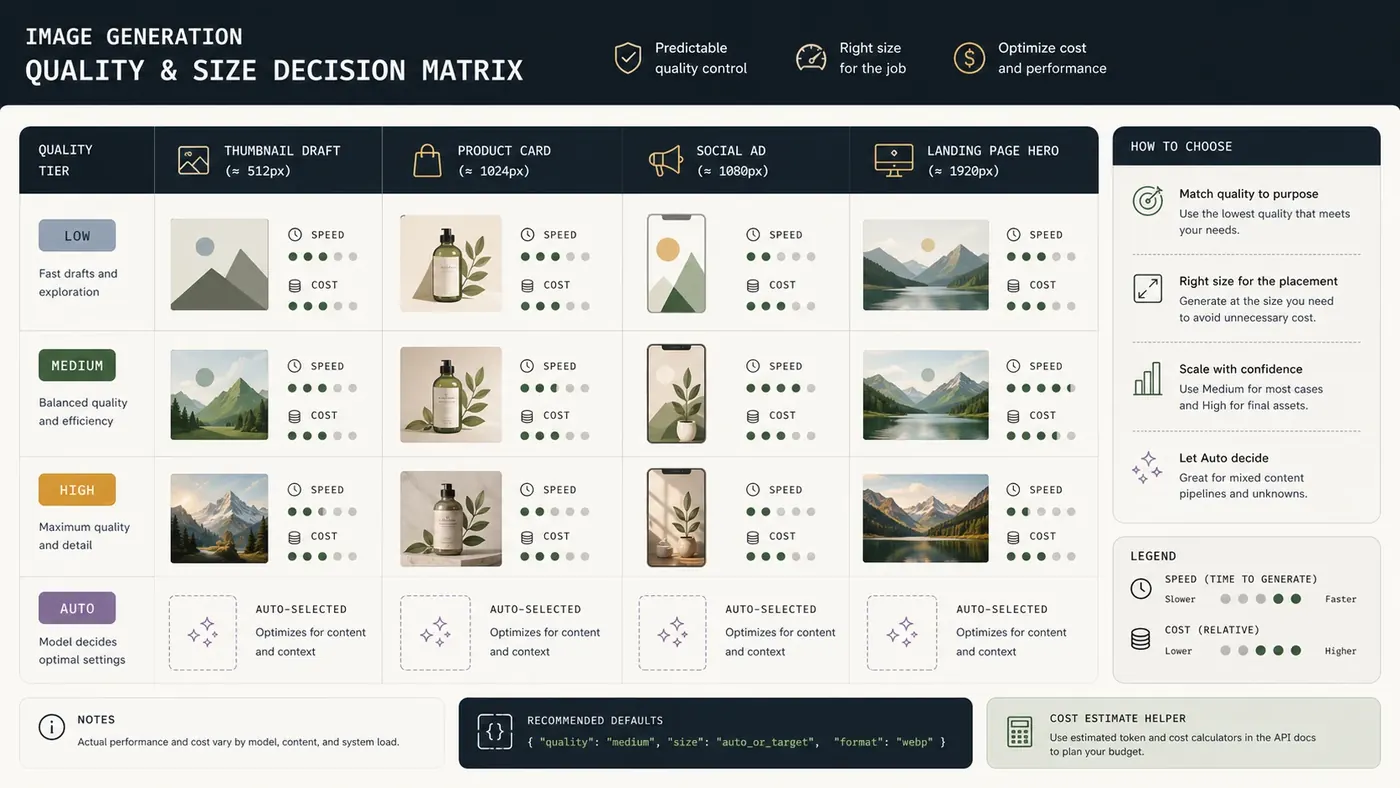
Use quality as a business decision, not as a default preference.
| Quality | Best For | Avoid When | Budget Rule |
|---|---|---|---|
low | Thumbnails, ideation, internal previews, prompt testing | The image is customer-facing or must preserve fine detail | Use for cheap learning and discardable drafts |
medium | Product cards, blog visuals, listing improvements, routine marketing assets | The asset is a flagship hero or paid campaign final | Use as the default production baseline |
high | Launch pages, paid ads, premium ecommerce, investor decks, final campaign visuals | You are still exploring the prompt | Use only after approval gates |
auto | Mixed workflows where you trust model-side quality selection | Strict budget controls or deterministic estimates | Use when convenience matters more than exact forecasting |
The most common waste pattern is using high during exploration. If the team has not approved the composition, subject, and brand fit, high quality just makes expensive drafts.
Size And Aspect Ratio Decisions
Pricing discussions often focus on quality, but size can matter just as much. A team that generates large assets and then crops them into thumbnails is paying for pixels it may never show.
Decide the final placement first:
| Placement | Sensible Planning Choice |
|---|---|
| Avatar or small thumbnail | Generate small, inspect fast, upscale or regenerate only if accepted |
| Blog header | Use the final blog ratio instead of generating a generic square |
| Product card | Use consistent square or card ratio to reduce editing waste |
| Paid social ad | Generate directly in the target platform ratio |
| Landing page hero | Reserve high quality for the final approved concept |
If your UI needs several ratios, do not blindly generate every ratio for every candidate. First pick the winning concept, then create ratio variants.
API vs ChatGPTImages UI
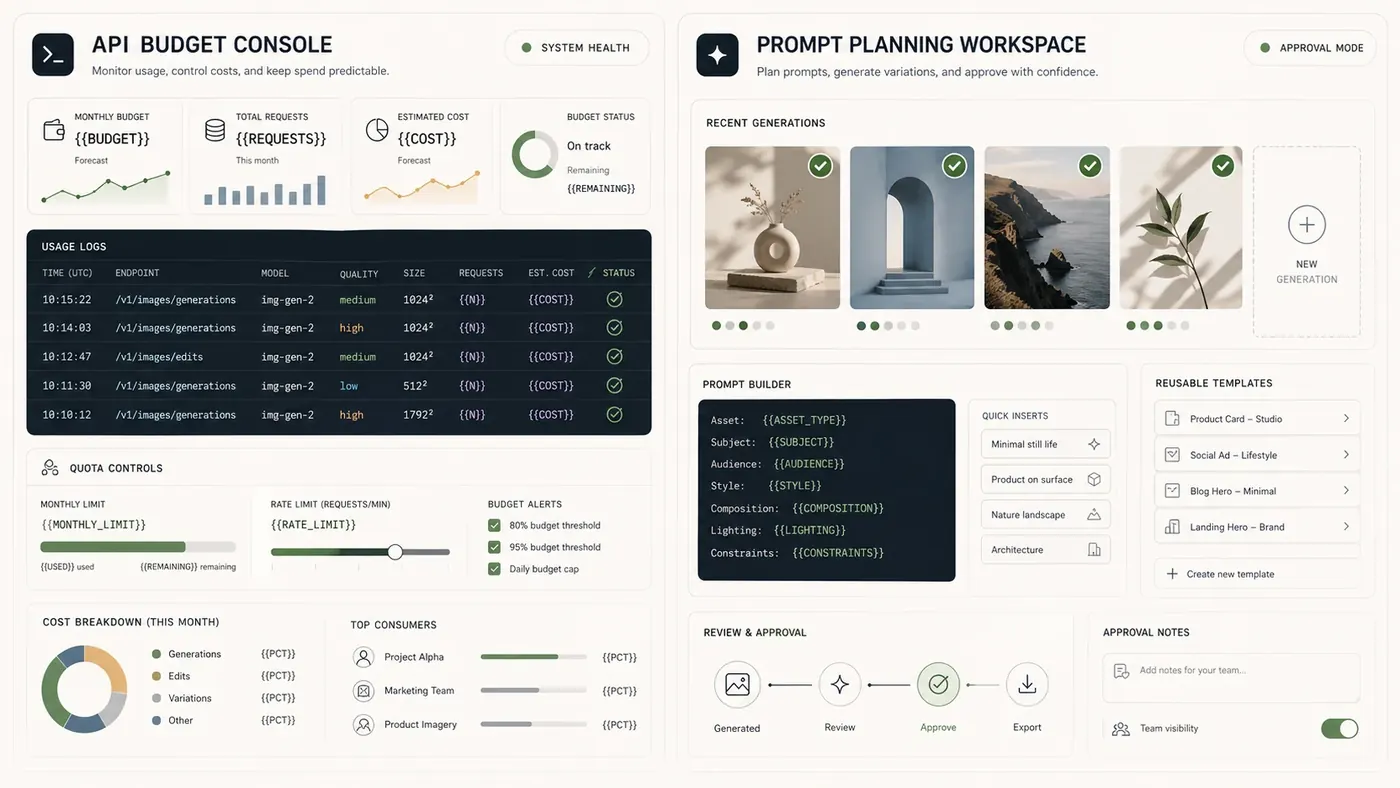
Use the API when you need automation, user-specific generation, backend control, logging, or integration into your product. Use ChatGPTImages UI and guide workflows when you need prompt planning, visual comparison, and reusable templates before committing API spend.
| Need | Better Surface |
|---|---|
| Generate images inside your app | OpenAI API |
| Run batch jobs from backend events | OpenAI API |
| Track cost per user, team, or campaign | OpenAI API logs plus your own analytics |
| Compare prompt templates manually | ChatGPTImages UI |
| Teach a non-technical team how to write prompts | ChatGPTImages guide and examples |
| Build a prompt library before engineering starts | ChatGPTImages UI |
Important distinction: ChatGPTImages can help you plan and test prompts, but API billing is governed by OpenAI's pricing and your API usage.
Three Example Prompts With Budget Lessons
Each example below pairs a reusable prompt with a planned image asset. The image is not just decoration; it shows whether the budget strategy worked.
Example 1: Low-Cost SaaS Thumbnail Draft
Create a small square SaaS workspace thumbnail.
Subject: an abstract dashboard with three clean panels, a progress ring, and a tiny team activity feed.
Scene: neutral off-white background with subtle grid texture.
Style: simple 3D editorial illustration, restrained colors, no brand logos.
Composition: centered object, readable silhouette at small size, no tiny text.
Quality strategy: generate as a low-quality draft first because this is a small UI thumbnail.
Constraints: avoid fake readable words, avoid clutter, avoid photorealistic people.
Generated example:

What the image proves: at thumbnail scale, composition and silhouette matter more than high-detail rendering. This is the kind of asset that should be tested at low before spending on higher quality.
Example 2: Medium-Quality Product Listing Image
Create a square marketplace product listing image.
Subject: a compact desk lamp with matte charcoal finish and warm bulb glow.
Scene: clean tabletop with soft neutral background and gentle shadow.
Style: ecommerce product photography, realistic, clear edges, trustworthy lighting.
Composition: product centered, full object visible, enough margin for marketplace cropping.
Quality strategy: use medium quality because this is customer-facing but not a flagship campaign hero.
Constraints: no fake brand mark, no unreadable packaging text, no hands, do not crop the base.
Generated example:

What the image proves: medium is often the practical default for production images where clarity and trust matter, but the asset does not justify high-quality exploration costs.
Example 3: High-Quality Campaign Hero After Approval
Create a wide campaign hero image for a paid launch landing page.
Subject: a founder's desk at sunrise with a laptop, clean analytics chart shapes, coffee, and a notebook.
Scene: warm office light, premium but not luxury, realistic materials.
Style: polished commercial photography with cinematic depth and crisp foreground detail.
Composition: wide 16:9 frame, visual weight on the left, clean negative space on the right for HTML headline.
Quality strategy: use high quality only after the concept, ratio, and copy space are approved.
Constraints: no readable UI text, no logos, no hands, no distorted laptop, no text baked into the image.
Generated example:

What the image proves: high quality is valuable when the layout is already approved and the image will carry paid traffic or a launch page. It is wasteful before that point.
Common Pricing Mistakes
| Mistake | Why It Wastes Budget | Better Decision |
|---|---|---|
| Hardcoding prices into a public article | API prices can change | Use placeholders and verify official pricing before publish |
| Using high quality for every draft | Most drafts are discarded | Draft low, approve, then regenerate winners |
| Ignoring retries | Human taste creates extra generations | Track accepted images, rejected images, and retries |
| Generating too many aspect ratios too early | Most concepts never ship | Pick winning concept first, then create ratio variants |
| Letting every user regenerate endlessly | One user can create runaway cost | Add quotas, cooldowns, and approval steps |
| Treating API and UI costs as the same thing | Different surfaces have different billing models | Estimate API spend from API usage only |
| Not logging prompt template versions | You cannot identify expensive templates | Store template ID, quality, size, and result status |
Practical Cost Controls For Production
For a real SaaS or growth workflow, implement controls before launch:
- Set default quality by workflow stage, not by user preference.
- Add a per-user or per-workspace monthly generation quota.
- Cache accepted outputs and avoid regenerating identical requests.
- Store prompt template versions so expensive templates can be fixed.
- Log output status: accepted, edited, rejected, regenerated, or deleted.
- Require confirmation before high-quality or multi-ratio generation.
- Show internal cost estimates to admins before batch jobs run.
- Use human approval before scaling a campaign template.
Try this workflow
Do not start cost planning with the highest quality setting. Start with the workflow: what triggers generation, how many outputs are discarded, what size ships, and when quality should increase. Use ChatGPTImages to plan prompts and compare visual strategies, then use the OpenAI API with logging, quotas, and approval gates when you are ready to automate.
Related guides
Official sources
Model names, API behavior, and pricing can change. Verify factual claims against the official sources below before budgeting or publishing.